How to Sell on Multiple Marketplaces from PrestaShop Using XML Feeds
Running a PrestaShop store means managing your product catalog in one place. But your customers are shopping across many platforms — Google Shopping, Facebook, Instagram, price comparison sites like idealo or Skroutz, and regional marketplaces.
The solution is not to manually upload your products to each platform. The solution is a product feed — a file that automatically pushes your product data wherever it needs to go.
What Is a Product Feed?
A product feed is a structured file (XML or CSV) that contains your product data: name, price, stock, images, categories, and more. Each marketplace has its own required format, field names, and rules.
You generate the feed once, host it at a URL, and each platform fetches it on a schedule. Your products stay up to date automatically.
Why PrestaShop Needs a Feed Module
PrestaShop does not have native feed generation for external channels. Without a module, you would need to:
– Manually export products to spreadsheets
– Reformat them for each platform’s requirements
– Re-upload them every time a price or stock level changes
That is not scalable for any store with more than a few dozen products.
A PrestaShop XML feed module handles all of this automatically — generating properly formatted feeds for each channel and keeping them updated via CRON.
The Main Channels and Their Feed Requirements
Google Shopping
Requires a Google Merchant Center XML feed with mandatory fields: id, title, description, link, image_link, price, availability, brand, and GTIN (where applicable). Google is strict about price accuracy and image quality.
Facebook and Instagram Catalog
Meta requires a product catalog feed to run Dynamic Product Ads — ads that automatically show visitors the exact products they viewed on your store. The feed must include id, title, description, image_link, link, price, availability, and condition.
idealo
One of Europe’s largest price comparison platforms. idealo has its own XML format with required fields including EAN, manufacturer, and delivery time. Accurate pricing is essential — idealo penalises feed errors.
Skroutz
The leading price comparison site in Greece. Skroutz has a well-documented XML format and requires regular feed updates to maintain product visibility.
Trovaprezzi
Italy’s major price comparison platform. Similar XML structure to idealo with Italian-specific requirements.
Amazon and eBay
Both platforms have their own feed formats and listing requirements. A good feed module will let you map PrestaShop fields to marketplace-specific attributes.
How XML Feeds Pro Handles Multi-Channel Distribution
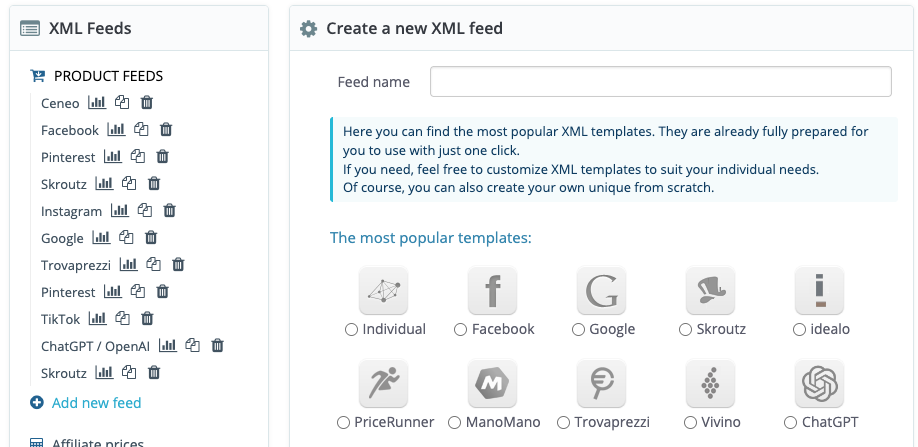
XML Feeds Pro for PrestaShop includes ready-made templates for 100+ channels. Instead of building each feed format from scratch, you select a template, review the field mapping, and your feed is ready.
Key features for multi-channel selling:
Template library — Pre-built templates for Google, Facebook, idealo, Skroutz, Trovaprezzi, Amazon, eBay, and many more. Each template follows the channel’s exact format requirements.
Field mapping — Map your PrestaShop product attributes to the fields each marketplace expects. If your product titles are too long for a specific platform, you can set character limits.
Product filtering — Include only specific categories, price ranges, or products with images. Exclude out-of-stock items or products you do not want to advertise.
Multiple feeds — Create separate feeds for different countries, languages, or currencies. Useful if you sell in France, Spain, and Germany with different pricing.
CRON automation — Set feeds to update automatically every hour, every 6 hours, or daily. Your prices and stock levels stay accurate across all channels without manual work.
Setting Up Your First Multi-Channel Feed
1. Install XML Feeds Pro in your PrestaShop back office
2. Go to the module and create a new feed
3. Select a channel template (e.g. Google Shopping)
4. Review the field mapping — most fields are pre-mapped automatically
5. Set filters if needed (e.g. exclude products without EAN)
6. Save and copy the feed URL
7. Submit the URL to the platform’s merchant dashboard
8. Set up CRON to keep the feed updated
Repeat steps 2–7 for each additional channel.
Common Feed Mistakes to Avoid
Inaccurate prices — If your feed price does not match the price on the product page, Google and other platforms will reject or penalise your listings.
Missing product identifiers — GTIN, EAN, MPN, and brand are required on most platforms. Add them to your PrestaShop product catalog if they are missing.
Low-quality images — Google requires a minimum of 100x100px. idealo and Facebook recommend 800x800px or larger.
Outdated stock information — If a product shows as available in the feed but is out of stock on your site, customers will be disappointed and platforms may penalise your account. Use CRON to keep feeds updated frequently.
Is It Worth Selling on Multiple Channels?
Yes — but only if your feeds are accurate and up to date. Poorly managed feeds lead to rejected listings, wasted ad spend, and negative customer experiences.
A reliable feed module is the foundation of any multi-channel strategy. Once your feeds are running automatically, adding a new channel takes minutes rather than days.
XML Feeds Pro supports Google Shopping, Facebook Catalog, idealo, Skroutz, Trovaprezzi, and 100+ channels. Trusted by 8,000+ PrestaShop store owners. One-time payment. View the module →
 XML Feeds Pro
  OrderPad B2B Quick Order
  Product importer Pro
  CSV feeds Pro
  Google Indexing API
  Dynamic pricing
  Hot Deals Pro